-
Shop
- Adidas
- Advanced Technologies
- AI Skills
- Armani Fashion
- Beauty
- Best Sellers
- Calvin Klein Fashion
- Car Accessories
- Car Buying & Ownership
- Car Electronics
- Confidence
- Dating & Social Skills
- Denim
- 7FOR
- AGOLDE
- Antony Morato
- Armani Exchange
- Boss
- Brunello Cucinelli
- Calvin Klein Jeans
- Costume National
- Desigual
- Diesel
- Dolce & Gabbana
- Dsquared²
- Ermanno Scervino
- Fendi
- Gianni Lupo
- Guess Jeans
- Ichi
- Just Cavalli
- Lee
- Levi's
- Liu Jo
- Morgan De Toi
- Mother Denim
- Only
- Pepe Jeans
- Pinko
- Replay
- Tommy Hilfiger Jeans
- Valentino
- Vero Moda
- Education & Learning
- Family & Parenting
- Fashion
- Alexander McQueen
- Bags
- Bags & Wallets
- Balenciaga
- Belts
- Blazers
- Blouses & Shirts
- Bottega Veneta
- Brunello Cucinelli
- Burberry
- Chanel
- Chloé
- Dior
- Dolce & Gabbana
- Dresses
- Etro
- Gucci
- Hats & Hair Accessories
- Hoodies & Sweatshirts
- Jewelry
- Jil Sander
- Jimmy Choo
- Keychains
- Kiton
- Luggage
- Luggage Bags
- Miu Miu
- Off-White
- Outerwear
- Prada
- Rick Owens
- Saint Laurent
- Shoe Accessories
- Socks & Tights
- Sunglasses
- Sweaters & Cardigans
- The Row
- Tom Ford
- Valentino Garavani
- Versace
- Vivienne Westwood
- Watches
- Fashion Accessories
- Financial Education
- Furniture
- Furniture & Decor
- Gadgets
- Gadgets & Electronics
- Guess Fashion
- Health & Beauty
- Health & Wellness
- Home & Garden
- Home Styling & Organization
- Home Supplies
- Interior Accessories
- Kids & Babies
- Kitchen & Dining
- Lighting
- Mindset
- Nike
- Outdoors
- Parenting & Child Development
- Patio, Lawn & Garden
- Personal Growth
- Personal Style & Fashion
- Pet Care
- Pet Lifestyle & Wellness
- Pet Supplies
- Pets
- Road Trip Accessories
- Shoes
- Special Deals
- Sport & Outdoors
- Storage & Organization
- Summer 2025 Fashion Collection
- Super Deals
- Tommy Hilfiger Fashion
- Travel
- Travel & Adventure
- Wealth
- Wealth Building
- Budgeting & Saving
- Cryptocurrency Investing
- Debt Management
- Entrepreneurship & Business Growth
- Family Finance & Budgeting
- Financial Independence
- Financial Mindset & Psychology
- Financial Planning
- Frugal Living & Expense Hacks
- Goal Setting
- High-Income Skills
- Investing Basics
- Leadership
- Networking & Mentorship
- Passive Income Strategies
- Real Estate Investing
- Side Hustles
- Stock Market Investing
- Wellness
- Winter Fashion
- YouTube Shorts Best-Sellers
- Popular
- Best deals
65% Wireless Mechanical Keyboard: Knob, Hot-Swap, QMK
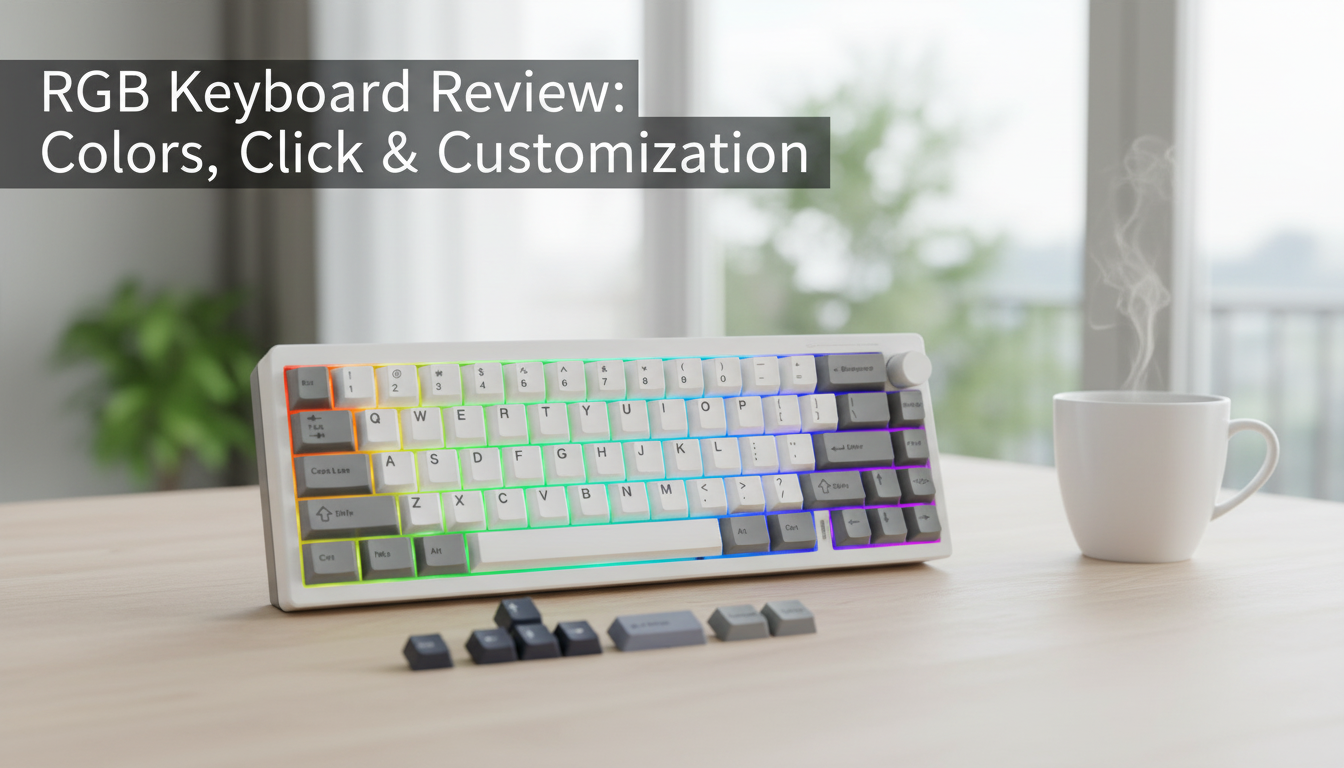
65% Wireless Custom Mechanical Keyboard with Knob, Hot Swap, RGB & QMK/VIA Support
A compact 65% layout keeps the essentials—arrows and navigation—while saving desk space for mouse movement and a cleaner setup. Add wireless flexibility, a programmable knob for quick control, hot-swappable switches for easy tuning, per-key style with RGB, and deep remapping through QMK/VIA, and the result is a keyboard built to adapt to both work and play. For more guidance, see [Sponsored] RK-S98 Mechanical Keyboard review – Geekhack.
What Makes a 65% Layout So Practical
A 65% keyboard lands in a sweet spot: it trims the bulk without forcing you to give up daily-use keys. You keep dedicated arrow keys and a right-side navigation cluster, but lose the function row and numpad—two areas many users access through layers anyway. For further reading, see Top Wireless Keyboards with QMK Support – KeebsForAll.
- Keeps arrows plus a compact nav column for quick movement in documents and spreadsheets
- Frees up desk space for wider mouse sweeps and a more centered, relaxed posture
- Balances gaming and productivity: compact, but rarely feels like “missing keys”
- Pairs naturally with layers for function keys and macros when using QMK/VIA
Wireless Freedom Without Giving Up Responsiveness
Wireless mechanical keyboards aren’t just about aesthetics. Removing the cable simplifies multi-device desks, makes quick workstation swaps easier, and keeps your setup cleaner when routing wires is a hassle.
- Less cable clutter, especially helpful on minimal desks and shared workstations
- Stable connection is the real quality marker—consistent registration matters most in long sessions
- Consider your use case: desktop, couch, travel, or moving between home and office
- Battery expectations depend heavily on charging habits and power-saving settings
The Knob: Fast Control for Volume, Zoom, Scroll, and More
A programmable knob is one of those features that becomes hard to live without once it’s mapped well. Instead of hunting for on-screen sliders or reaching for function combos, you get tactile control within a finger’s reach.
- Popular mappings: volume up/down, mute, zoom, horizontal scroll, timeline scrubbing, brush size, and tab switching
- A press action makes it even more useful (tap to mute, press to toggle layers, or switch modes)
- Layer-based knob mappings can make it app-friendly: one layer for meetings, another for editing
- Especially useful for creators who want adjustments without leaving the home row
Hot-Swap Sockets: Customize Feel and Sound in Minutes
Hot-swap sockets remove the barrier to experimenting. Instead of committing to a single switch type, you can swap in new switches without soldering—ideal for dialing in a typing feel, reducing fatigue, or chasing a particular sound profile.
- Try different switch weights, tactility levels, and sound signatures without specialized tools
- Replace a faulty switch quickly instead of troubleshooting the entire board
- Mix and match: heavier modifiers, lighter alphas, or a tactile spacebar for better feedback
- Pair switch choices with keycap profiles to fine-tune comfort and acoustics
Switch Feel at a Glance (Common Options)
| Type | Feel | Typical Use | Why People Choose It |
|---|---|---|---|
| Linear | Smooth, no bump | Gaming, fast typing | Consistent motion and quieter options |
| Tactile | Noticeable bump | Work, mixed use | Feedback without loud click |
| Clicky | Bump + click | Preference-based | Audible confirmation and distinct feel |
RGB Lighting: Useful Feedback, Not Just Style
RGB can be subtle and functional, not just flashy. A gentle white backlight improves visibility in low light, while per-key color can help reinforce muscle memory for layers, macros, or important shortcuts.
- Use a static white or warm tone for comfortable night typing
- Assign a layer indicator color so you instantly know when navigation or function layers are active
- Highlight frequently used shortcuts (copy/paste, app tools, or push-to-talk)
- Wireless runtime is affected by brightness and animation—static and dimmer often lasts longer
QMK and VIA: Powerful Remapping and Macros
Deep customization is where a compact keyboard really shines. With QMK and VIA support, every key can be remapped, layers can be stacked for different workflows, and macros can reduce repetitive actions into a single press.
- Remap any key to match your preferred layout across operating systems and devices
- Create layers for function keys, media controls, navigation, and app-specific shortcuts
- Build macros for repetitive tasks like meeting controls, coding snippets, or editing commands
- Assign knob rotation and press actions per layer for context-sensitive control
VIA is a fast, visual way to adjust mappings, while QMK supports deeper firmware-level customization. For more details, see the official resources: QMK Firmware Documentation and the VIA Keyboard Configurator.
Daily Use Scenarios: Work, Gaming, and Creative Tools
Setup Tips for a Smooth First Week
Feature Checklist: How This Keyboard Compares to Typical Compact Boards
| Feature | This Keyboard | Typical Basic 65% Keyboard |
|---|---|---|
| Wireless | Yes | Often wired only |
| Knob control | Yes | Not always included |
| Hot-swap switches | Yes | Sometimes (varies by model) |
| RGB lighting | Yes | Sometimes limited or single-color |
| Deep customization | QMK/VIA support | Often basic software or none |
Where to Buy
Shop the product here: 65% Wireless Custom Mechanical Keyboard with Knob, Hot Swap, RGB & QMK/VIA Support. Check availability and current price before ordering.
More In-Stock Picks
FAQ
What does hot-swappable mean on a mechanical keyboard?
Hot-swappable means you can remove and replace mechanical switches without soldering. It makes it easy to test different switch types and quickly replace a switch if one ever fails.
How do QMK and VIA help with customization?
They let you remap keys, create layers, and assign macros so the layout fits your workflow. VIA offers quick changes through a graphical interface, while QMK enables deeper firmware-level control, including advanced layer behavior and knob actions.
Does RGB lighting affect battery life in wireless mode?
Yes—higher brightness and animated effects typically reduce wireless runtime. Using a static lighting mode, lowering brightness, or turning RGB off when it’s not needed can help extend battery life.


